What can demo trading teach you about crypto orders?
Crypto demo trading lets you submit simulated orders with virtual funds. It is useful for learning what an order ticket does, how the platform reports a partial fill, and whether you can explain every change in position size. A paper balance alone tells you little about what your orders would have filled at in a live market.
Start with a test you can score
Pick one order type you would have trouble explaining from memory. Write down its side, size, price instruction and time-in-force before submitting it. Use the smallest virtual size your simulator accepts, then watch its status and order history. A test ends when you can account for every unit as filled, canceled or still open.
| What to test | What to write down afterward |
|---|---|
| A limit order far from the current price | What makes the order eligible to fill and how to cancel the remainder |
| An immediate-or-cancel limit order | Filled quantity, canceled quantity, and the difference between those two events |
| A stop-limit order | Trigger reference, trigger timestamp, price and status of the submitted limit |
| A simulated close | Position size before and after, fees recorded by the simulator, and any still-open orders |
If a platform does not simulate an instruction, mark it as unavailable. An exercise you could not run is different from one you ran and passed.
Try this without signing up
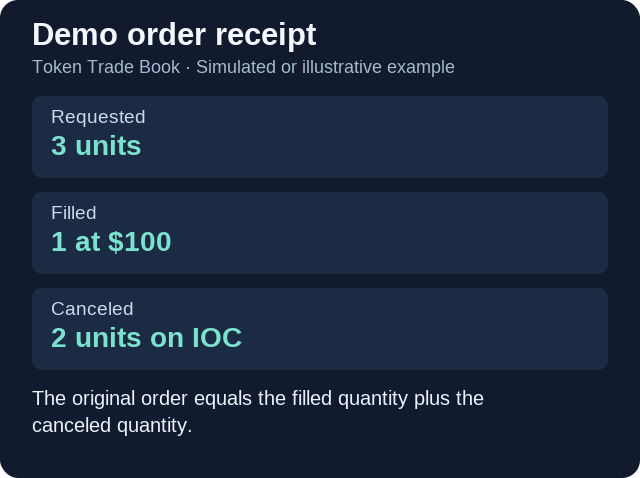
Imagine a buy market order for three units. One unit is offered at $100 and two at $101. If the snapshot holds through matching and all three units fill, you pay $302 before fees, or about $100.67 per unit. A buy limit at $100 instead can take at most the unit available at that price under the same snapshot. The remaining two units can rest if the order allows it. With an immediate-or-cancel instruction, those two units would be canceled.
The difference is visible in the receipt. An average execution price describes what actually filled. An order quantity describes what you originally requested. Reading these as separate quantities prevents a common mistake when you review simulated performance.
Compare the simulator with the real product
Check whether the simulator includes commissions, funding, margin liquidation, queue priority, price protection, and partial fills. Features can differ between paper environments even when their tickets look similar. TradingView, for example, documents that paper trading starts with configured leverage that applies across the paper account. OKX describes virtual-money demo trading. Read the product documentation and record what you could verify alongside every session.
A simple journal entry is enough: order, expected outcome, observed outcome, why they differed, simulator rule to verify. If you are simulating a strategy, also separate decisions made before the event from explanations added after seeing the chart. Saving a screenshot at submission makes that distinction easier to check.
What result counts as progress?
Pass the exercise when you can reproduce the accounting and find the live product rule that might change the result. Do not treat a paper win rate or a single smooth fill as evidence of likely returns. Paper tools can help you rehearse decisions and test the workflow. They cannot reproduce every feature of live matching, available liquidity, market access or fees.
Continue with the Order Execution learning path or check the replay methodology and data.